[Ubuntu] 15. WEB(Nginx) + WAS(PHP) + DB(MariaDB)
카테고리: UBUNTU
01) WEB 구성요소
| 구성요소 | 설명 |
|---|---|
| WEB 서버 | 정적인 컨텐츠(문자, 그림, 오디오, 비디오 등)를 처리하는 서버 |
| WAS 서버 | 동적인 컨텐츠(사용자의 입력 값을 기반으로 프로그램의 동작이 달라 짐)를 처리하는 서버 |
| DB 서버 | 데이터베이스를 생성, 관리, 사용, 제어하는 서버 |
02) 서버 정보

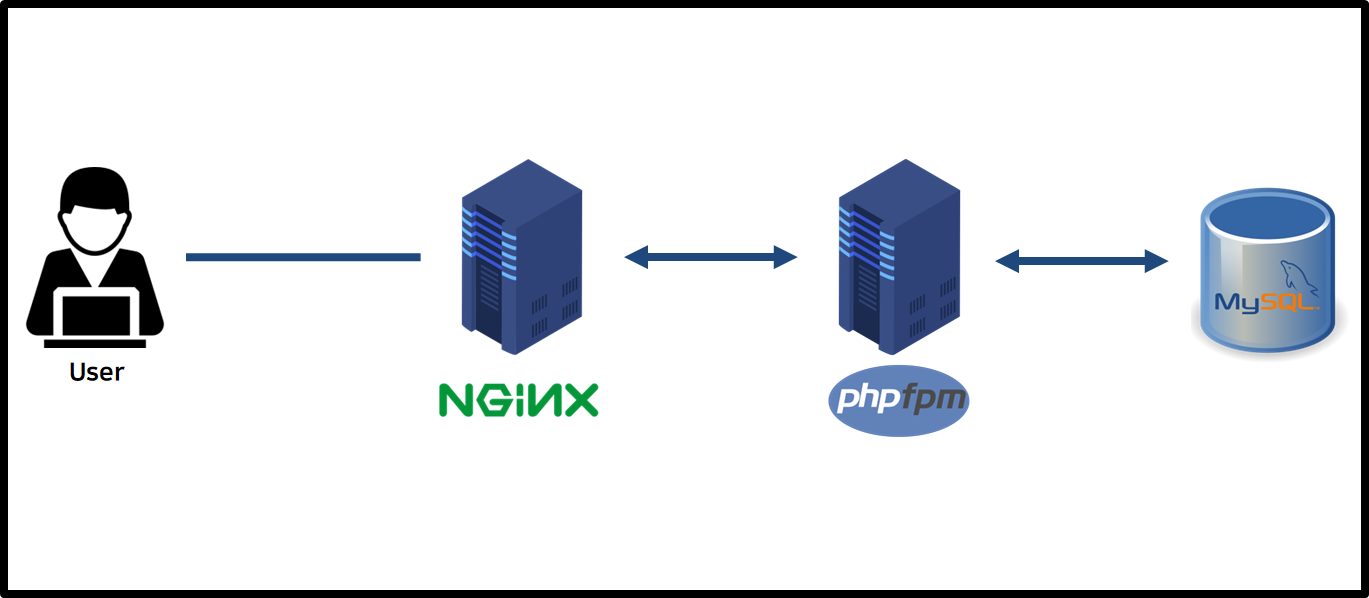
03) 서버 구성
a) WEB Server - Apache install and configuration
# /etc/hosts에 서버 IP 주소 정보 추가
cat <<EOF >> /etc/hosts

192.168.219.100 web
192.168.219.111 was01
192.168.219.112 was02
192.168.219.200 db
EOF
# Nginx 설치
apt update

apt -y install nginx
vim /etc/nginx/sites-available/default

# WAS 서버를 2대 이상 사용하고 분산하고 싶을 때 - (1)
#upstream myServer{
#    server was01:9000 max_fails=3 fail_timeout=10s;
#    server was02:9000 max_fails=3 fail_timeout=10s;
#}

server {
    listen 80 default_server;
    listen [::]:80 default_server;

    root /var/www/html;

    index index.html index.htm index.nginx-debian.html;

    server_name _;

    location / {

        try_files $uri $uri/ =404;
    }

    # 추가해야할 부분
    location ~ \.php$ {
        root           /usr/share/nginx/html;
        fastcgi_pass   was01:9000;
        # WAS 서버를 2대 이상 사용하고 분산하고 싶을 때 - (2)
        #fastcgi_pass   myServer;
        fastcgi_index  index.php;
        fastcgi_param  SCRIPT_FILENAME  $document_root$fastcgi_script_name;
        include        fastcgi_params;
    }
}
# 서비스 재시작/활성화/확인
systemctl enable nginx; systemctl restart nginx; systemctl status nginx
b) WAS Server - PHP-FPM install and configuration
# 설치
apt-get -y install software-properties-common

add-apt-repository ppa:ondrej/php

apt update

apt-get install php7.3 -y

apt-get install php7.3-bcmath php7.3-bz2 php7.3-cgi php7.3-cli php7.3-common php7.3-curl php7.3-dba php7.3-dev php7.3-enchant php7.3-fpm php7.3-gd php7.3-gmp php7.3-imap php7.3-interbase php7.3-intl php7.3-json php7.3-ldap php7.3-mbstring php7.3-mysql php7.3-mysqlnd php7.3-odbc php7.3-opcache php7.3-pgsql php7.3-phpdbg php7.3-pspell php7.3-readline  php7.3-recode php7.3-snmp php7.3-soap php7.3-sqlite3 php7.3-sybase php7.3-tidy php7.3-xml php7.3-xmlrpc php7.3-zip  php7.3-xsl  -y
# 설정 01
vi /etc/php/7.3/fpm/php.ini

date.timezone = Asia/Seoul

# 설정 02
vi /etc/php/7.3/cli/php.ini

date.timezone = Asia/Seoul

# 설정 03
vim /etc/php/7.3/fpm/pool.d/www.conf

listen = 9000
listen.allowed_clients = 192.168.219.100
# 서비스 재시작/활성화/확인
systemctl restart php7.3-fpm; systemctl enable php7.3-fpm; systemctl status php7.3-fpm
# 테스트 php 파일 생성
mkdir -p  /usr/share/nginx/html
cat <<EOF >>  /usr/share/nginx/html/info.php
<?php phpinfo(); ?>
EOF
b-1) 결과 확인
c) DB Server - MariaDB Install
cat <<EOF >> /etc/hosts

192.168.219.100 web
192.168.219.111 was01
192.168.219.112 was02
192.168.219.200 db
EOF
apt -y update

apt -y install mariadb-server
sed -i "s/bind-address            = 127.0.0.1/bind-address            = 0.0.0.0/g" /etc/mysql/mariadb.conf.d/50-server.cnf

systemctl restart mysql; systemctl enable mysql; systemctl status mysql
# DB 설정
mysql_secure_installation
mysql -u root -p

create database test;

GRANT ALL PRIVILEGES ON *.* TO 'root'@'%' IDENTIFIED BY 'PASSWORD';

exit;
d) WAS Server - DB connection check
cat <<EOF >> /usr/share/nginx/html/dbtest.php
<?php
    \$host = '192.168.219.200';
    \$user = 'root';
    \$pw = '1234';
    \$dbName = 'test';
    \$mysqli = new mysqli(\$host, \$user, \$pw, \$dbName);

    if(\$mysqli){
        echo "MySQL 접속 성공";
    }else{
        echo "MySQL 접속 실패";
    }
?>
EOF
댓글 남기기