[Linux 기초] 25. LVM(Linux Volume Manager / 리눅스 볼륨 메니져)
카테고리: LINUX
태그: linux
01. LVM(Linux Volume Manager)
LVM이란 리눅스의 저장 공간을 효율적이고 유연하게 관리하기 위한 커널의 한 부분으로, LVM을 사용하면 여러 개의 하드디스크를 하나의 파일 시스템으로 사용하거나 필요에 따라 다시 나눌 수 있다.
a) 구성 요소
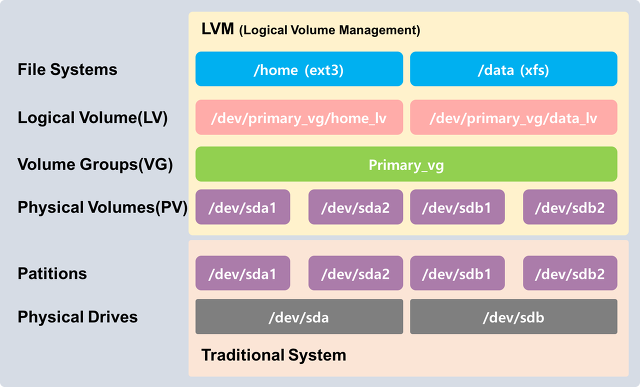
| 구성 요소 | 설명 |
|---|---|
| PV (Physical Volume) | 물리적인 디스크 공간으로 LVM을 사용하려면 먼저 물리적인 디스크를 하나 이상의 PV로 구성해야 한다. |
| VG (Volume Group) | 하나 이상의 PV를 묶은 가상의 디스크 그룹으로 VG는 논리적인 볼륨을 생성할 때 사용된다. |
| LV (Logical Volume) | VG에서 생성된 논리적인 볼륨으로 LV는 파일 시스템을 만들거나 다른 데이터를 저장하는데 사용된다. |
b) PV (Physical Volume) 생성/제거/확인
| 명령 | 설명 |
|---|---|
| pvscan | PV를 위한 모든 디스크를 조사하기 위해 사용하는 명령 |
| pvcreate | LVM 용도의 하드디스크, LUN, MD, 파티션으로 만들기 위해 사용하는 명령 |
| pvdisplay | 존재하는 PV 상세 정보를 확인하기 위해 사용되는 명령 |
| pvremove | 존재하는 PV를 제거하기 위해 사용되는 명령 |
$ lsblk | grep 10G
sdb           8:16   0   10G  0 disk
sdc           8:32   0   10G  0 disk
sdd           8:48   0   10G  0 disk
sde           8:64   0   10G  0 disk
sdf           8:80   0   10G  0 disk
sdg           8:96   0   10G  0 disk

$ pvcreate /dev/sdb /dev/sdc /dev/sdd
  Physical volume "/dev/sdb" successfully created.
  Physical volume "/dev/sdc" successfully created.
  Physical volume "/dev/sdd" successfully created.

$ pvscan
  PV /dev/sdb                       lvm2 [10.00 GiB]
  PV /dev/sdc                       lvm2 [10.00 GiB]
  PV /dev/sdd                       lvm2 [10.00 GiB]
  Total: 3 [<30.00 GiB] / in use: 0 [0 ] / in no VG: 3 [30.00 GiB]

$ pvdisplay /dev/sdb
  "/dev/sdb" is a new physical volume of "10.00 GiB"
  --- NEW Physical volume ---
  PV Name               /dev/sdb
  VG Name
  PV Size               10.00 GiB
  Allocatable           NO
  PE Size               0
  Total PE              0
  Free PE               0
  Allocated PE          0
  PV UUID               fclc1G-WA6M-v6k4-glUW-8X1m-60RU-9TZGfT

$ pvremove /dev/sdd
  Labels on physical volume "/dev/sdd" successfully wiped.

$ pvscan
  PV /dev/sdb                       lvm2 [10.00 GiB]
  PV /dev/sdc                       lvm2 [10.00 GiB]
  Total: 2 [<20.00 GiB] / in use: 0 [<0 ] / in no VG: 2 [20.00 GiB]
b) VG (Volume Grop) 생성/제거/확인
| 명령 | 설명 |
|---|---|
| vgscan | 존재하는 VG를 확인하기 위해 사용되는 명령 |
| vgdisplay | 존재하는 VG의 세부 정보를 확인하기 위해 사용되는 명령 |
| vgcreate | VG (Volume Group)을 생성하기 위해 사용되는 명령 |
| vgextend | 존재하는 VG (Volume Group)에 PV(Physical Volume) 추가를 통해 용량을 확장하기 위해 사용되는 명령 |
| vgreduce | 존재하는 VG (Volume Group)에 PV(Physical Volume) 제거하는 명령 |
| vgremove | 존재하는 VG (Volume Group)에 제거하기 위해 사용되는 명령 |
# VG 생성
$ vgcreate vg_test /dev/sdb /dev/sdc
  Volume group "vg_test" successfully created

$ vgscan
  Found volume group "vg_test" using metadata type lvm2

$ vgdisplay -v vg_db | grep -E "PV Name | VG Size"
  VG Size               19.99 GiB
  PV Name               /dev/sdb
  PV Name               /dev/sdc

$ vgdisplay vg_test
  --- Volume group ---
  VG Name               vg_test
  System ID
  Format                lvm2
  Metadata Areas        2
  Metadata Sequence No  1
  VG Access             read/write
  VG Status             resizable
  MAX LV                0
  Cur LV                0
  Open LV               0
  Max PV                0
  Cur PV                2
  Act PV                2
  VG Size               19.99 GiB
  PE Size               4.00 MiB
  Total PE              5118
  Alloc PE / Size       0 / 0
  Free  PE / Size       5118 / 19.99 GiB
  VG UUID               iWFkkI-3K5Z-m2Ho-I9Mg-k2wP-snIV-QDORjZ

# PV 생성
$ pvcreate /dev/sdd /dev/sde
  Physical volume "/dev/sdd" successfully created.
  Physical volume "/dev/sde" successfully created.

# VG에 PV 추가
$ vgextend vg_test /dev/sdd /dev/sde
  Volume group "vg_test" successfully extended

$ vgdisplay -v vg_test | grep -E "PV Name | VG Size"
  VG Size               39.98 GiB
  PV Name               /dev/sdb
  PV Name               /dev/sdc
  PV Name               /dev/sdd
  PV Name               /dev/sde

# VG 제거
$ pvscan
  PV /dev/sdb                       lvm2 [10.00 GiB]
  PV /dev/sdc                       lvm2 [10.00 GiB]
  PV /dev/sdd                       lvm2 [10.00 GiB]
  PV /dev/sde                       lvm2 [10.00 GiB]
  Total: 4 [40.00 GiB] / in use: 0 [0   ] / in no VG: 4 [40.00 GiB]
c) LV (Logical Volume) 생성/제거/확인
| 명령 | 설명 |
|---|---|
| lvscan | 존재하는 LV를 확인하기 위해 사용되는 명령 |
| lvdisplay | 존재하는 LV의 세부 정보를 확인하기 위해 사용되는 명령 |
| lvcreate | 존재하는 VG로부터 용량을 분할하여 볼륨을 생성하기 확인하기 위해 사용되는 명령 |
| lvextend | 존재하는 LV에 용량을 추가하기 위해 사용되는 명령 |
| lvremove | 존재하는 LV에 제거하기 위해 사용되는 명령 |
$ vgdisplay -v vg_test | grep -E "PV Name | VG Size"
  VG Size               39.98 GiB
  PV Name               /dev/sdb
  PV Name               /dev/sdc
  PV Name               /dev/sde
  PV Name               /dev/sdd

# LV 생성
$ lvcreate -L 9g -n oradata01 vg_test
  Logical volume "oradata01" created.

$ lvcreate -L 9g -n oradata02 vg_test
  Logical volume "oradata02" created.

# 상세 정보 확인
$ lvdisplay vg_test/oradata01
  --- Logical volume ---
  LV Path                /dev/vg_test/oradata01
  LV Name                oradata01
  VG Name                vg_test
  LV UUID                T8fUOu-mSy4-pkFC-nc48-DHvo-Y8QG-q3TmEH
  LV Write Access        read/write
  LV Creation host, time localhost.localdomain, 2023-05-01 00:49:16 +0900
  LV Status              available
  # open                 0
  LV Size                9.00 GiB   # <-
  Current LE             2304
  Segments               1
  Allocation             inherit
  Read ahead sectors     auto
  - currently set to     8192
  Block device           253:2

$ vgdisplay vg_test
  --- Volume group ---
  VG Name               vg_test
  System ID
  Format                lvm2
  Metadata Areas        4
  Metadata Sequence No  5
  VG Access             read/write
  VG Status             resizable
  MAX LV                0
  Cur LV                2
  Open LV               0
  Max PV                0
  Cur PV                4
  Act PV                4
  VG Size               39.98 GiB
  PE Size               4.00 MiB
  Total PE              10236
  Alloc PE / Size       4608 / 18.00 GiB   # <-
  Free  PE / Size       5628 / 21.98 GiB
  VG UUID               aa3Hob-eTLU-Zzgt-RfIO-LZIR-8wxW-WE59W0

# 파일 시스템 생성 및 마운트
$ mkfs -t ext4 /dev/vg_test/oradata01

$ mkdir /oradata01

$ mount /dev/vg_test/oradata01 /oradata01/

$ mkdir /oradata02

$ mkfs -t ext4 /dev/vg_test/oradata02

$ mount /dev/vg_test/oradata02 /oradata02/

$ df -h | grep /oradata0
/dev/mapper/vg_test-oradata01  8.8G   24K  8.3G   1% /oradata01
/dev/mapper/vg_test-oradata02  8.8G   24K  8.3G   1% /oradata02

# LV에 용량을 추가
$ lvextend -L +3g -n /dev/vg_test/oradata01
  Size of logical volume vg_test/oradata01 changed from 9.00 GiB (2304 extents) to 12.00 GiB (3072 extents).
  Logical volume vg_test/oradata01 successfully resized.

$ lvextend -L +3g -n /dev/vg_test/oradata02
  Size of logical volume vg_test/oradata02 changed from 9.00 GiB (2304 extents) to 12.00 GiB (3072 extents).
  Logical volume vg_test/oradata02 successfully resized.

$ lvdisplay vg_test/oradata01 | grep "LV Size"
  LV Size                12.00 GiB

$ lvdisplay vg_test/oradata02 | grep "LV Size"
  LV Size                12.00 GiB

$ df -h | grep oradata
/dev/mapper/vg_test-oradata01  8.8G   24K  8.3G   1% /oradata01
/dev/mapper/vg_test-oradata02  8.8G   24K  8.3G   1% /oradata02

$ resize2fs /dev/mapper/vg_test-oradata01
resize2fs 1.46.5 (30-Dec-2021)
Filesystem at /dev/mapper/vg_test-oradata01 is mounted on /oradata01; on-line resizing required
old_desc_blocks = 2, new_desc_blocks = 2
The filesystem on /dev/mapper/vg_test-oradata01 is now 3145728 (4k) blocks long.

$ resize2fs /dev/mapper/vg_test-oradata02
resize2fs 1.46.5 (30-Dec-2021)
Filesystem at /dev/mapper/vg_test-oradata02 is mounted on /oradata02; on-line resizing required
old_desc_blocks = 2, new_desc_blocks = 2
The filesystem on /dev/mapper/vg_test-oradata02 is now 3145728 (4k) blocks long.

$ df -h | grep oradata
/dev/mapper/vg_test-oradata01   12G   24K   12G   1% /oradata01
/dev/mapper/vg_test-oradata02   12G   24K   12G   1% /oradata02

# LV 삭제
$ df -h | grep oradata
/dev/mapper/vg_test-oradata01   12G   24K   12G   1% /oradata01
/dev/mapper/vg_test-oradata02   12G   24K   12G   1% /oradata02

$ umount /oradata02

$ lvremove vg_test/oradata02
Do you really want to remove active logical volume vg_test/oradata02? [y/n]: y
  Logical volume "oradata02" successfully removed.

$ lvscan
  ACTIVE            '/dev/vg_test/oradata01' [12.00 GiB] inherit
댓글 남기기