[Retry, k8s] 25. 컨피그 & 스토리지 API - volumeMounts에서 사용 가능한 옵션
카테고리: KUBERNETES
태그: kubernetes
🔔 volumeMounts에서 사용 가능한 옵션
시작하기 전 선행 작업 및 확인해야할 내용
- https://revenge1005.github.io/kubernetes/ch03-6-1/
- https://revenge1005.github.io/kubernetes/ch03-6-2/
- https://revenge1005.github.io/kubernetes/ch03-6-3/
(1) 읽기 정용(ReadOnly) 마운트
$ cat <<EOF > sample-readonly-volumemount.yaml
apiVersion: v1
kind: Pod
metadata:
  name: sample-readonly-volumemount
spec:
  containers:
  - image: nginx:1.16
    name: nginx-container
    volumeMounts:
    - mountPath: /srv
      name: hostpath-sample
      readOnly: true
  volumes:
  - name: hostpath-sample
    hostPath:
      path: /etc
      type: DirectoryOrCreate
EOF


# 마운트한 영역의 파일을 변경할 수 없음
$ kubectl exec -it sample-readonly-volumemount -- cat /srv/motd
cat: /srv/motd: No such file or directory
command terminated with exit code 1


# 마운트한 영역의 파일 읽기는 가능
$ kubectl exec -it sample-readonly-volumemount -- cat /srv/motd
Hello World
(2) subPath
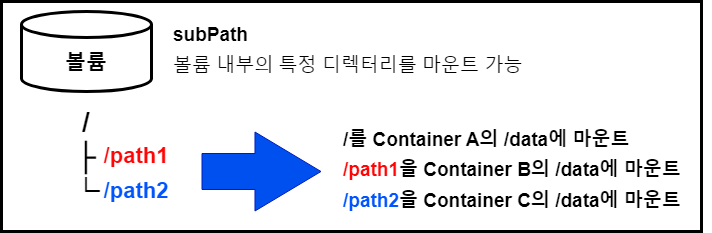
subPath는 볼륨을 마운트할 때 특정 디렉터리를 루트로 마운트하는 기능
-
아래 예제는 세 개의 컨테이너를 가진 하나의 파드를 생성하고, 각각의 컨테이너는 마운트한 디렉터리 바로 아래에 텍스트 파일을 배치한다.
-
subPath에서는 각 컨테이너가 하나의 볼륨을 사용하면서도 서로에게 영향을 주지 않도록 디렉터리를 나눌 수 있다.
-
그리고 subPath는 /path1/morepath 등과 같이 2계층 이상으로 지정할 수 있다.
cat <<EOF > sample-subpath.yaml
apiVersion: v1
kind: Pod
metadata:
  name: sample-subpath
spec:
  containers:
  - name: container-a
    image: alpine:3.7
    command: ["sh", "-c", "touch /data/a.txt; sleep 86400"]
    volumeMounts:
    - mountPath: /data
      name: main-volume
  - name: container-b
    image: alpine:3.7
    command: ["sh", "-c", "touch /data/b.txt; sleep 86400"]
    volumeMounts:
    - mountPath: /data
      name: main-volume
      subPath: path1
  - name: container-c
    image: alpine:3.7
    command: ["sh", "-c", "touch /data/c.txt; sleep 86400"]
    volumeMounts:
    - mountPath: /data
      name: main-volume
      subPath: path2
  volumes:
  - name: main-volume
    emptyDir: {}
EOF


# subPath /path1을 지정한 컨테이너
$ kubectl exec -it sample-subpath -c container-b -- find /data
/data
/data/b.txt


# subPath /path2을 지정한 컨테이너
$ kubectl exec -it sample-subpath -c container-c -- find /data
/data
/data/c.txt


# subPath를 지정하지 않은 컨테이너
$ kubectl exec -it sample-subpath -c container-a -- find /data
/data
/data/path2
/data/path2/c.txt
/data/a.txt
/data/path1
/data/path1/b.txt
댓글 남기기