[Retry, k8s] 22. 컨피그 & 스토리지 API - 컨피그맵
카테고리: KUBERNETES
태그: kubernetes
🔔 컨피그맵
쿠버네티스 컨피그맵은 컨테이너와 분리해서 키-값 쌍으로 환경설정 값을 저장하는데 사용하는 API 오브젝트
-
키-밸류 형식 외에도 nginx.conf, httpd.conf 같은 설정 파일 자체도 저장할 수 있다.
-
컨피그맵을 사용하면 동일한 컨테이너 이미지에 다른 설정 값을 이식해서 사용할 수 있다.
-
컨피그맵은 네임스페이스 별로 존재하며, 파드는 환경 변수, 커맨드-라인 인수 또는 구성 파일로 컨피그맵을 사용할 수 있다.
-
컨피그맵은 기밀이 아닌 데이터를 저장하도록 설계되었으므로, 저장하려는 데이터가 기밀인 경우 시크릿이나 다른 도구를 사용해야 한다.
(1) 컨피그맵 생성
-
컨피그맵 리소스는 하나의 컨피그맵 안에 여러 키-밸류 값이 저장된다.
-
하나의 컨피그맵마다 저장할 수 있는 사이즈는 총 1MB이다.
📜 kubectl로 파일에서 값을 참조하여 생성(–from-file)
# 파일로 컨피그맵 생성
$  kubectl create configmap --save-config sample-configmap --from-file=./nginx.conf
configmap/sample-configmap created


# 컨피그맵에 등록된 데이터 확인
$ kubectl get configmap sample-configmap -o json | jq .data
{
  "nginx.conf": "user  nginx;\nworker_processes  1;\n\nerror_log  /var/log/nginx/error.log warn;\n\npid        /var/run/nginx.pid;\n\n\nevents {\n    worker_connections  1024;\n}\n\n\nhttp {\n    include       /etc/nginx/mime.types;\n    \n    default_type  application/octet-stream;\n\n    log_format  main  '$remote_addr - $remote_user [$time_local] \"$request\" '\n                      '$status $body_bytes_sent \"$http_referer\" '\n                      '\"$http_user_agent\" \"$http_x_forwarded_for\"';\n\n    access_log  /var/log/nginx/access.log  main;\n\n    sendfile        on;\n    #tcp_nopush     on;\n\n    keepalive_timeout  65;\n\n    #gzip  on;\n    \n    include /etc/nginx/conf.d/*.conf\n}\n"
}


# 컨피그맵에 등록된 데이터 확인
$ kubectl describe configmap sample-configmap
Name:         sample-configmap
Namespace:    default
Labels:       <none>
Annotations:  <none>

Data
====
nginx.conf:
----
user  nginx;
worker_processes  1;

error_log  /var/log/nginx/error.log warn;

pid        /var/run/nginx.pid;


events {
    worker_connections  1024;
}


http {
    include       /etc/nginx/mime.types;

    default_type  application/octet-stream;

    log_format  main  '$remote_addr - $remote_user [$time_local] "$request" '
                      '$status $body_bytes_sent "$http_referer" '
                      '"$http_user_agent" "$http_x_forwarded_for"';

    access_log  /var/log/nginx/access.log  main;

    sendfile        on;
    #tcp_nopush     on;

    keepalive_timeout  65;

    #gzip  on;

    include /etc/nginx/conf.d/*.conf
}


BinaryData
====

Events:  <none>
-
컨피그맵 매니페스트는 data가 아닌 binaryData 필드를 사용하여 UTF-8 이외의 데이터를 포함하는 바이너리 데이터를 저장할 수 있다.
-
쿠버네티스에 직접 등록하는 것이 아니라 매니페스트 파일로 저장하려면 “–dry-run=client -o yaml 옵션”을 사용한다.
$ kubectl create configmap sample-configmap-binary \
--from-file image.jpg \
--from-literal=index.html="Hello, Kubernetes" \
--dry-run=client -o yaml \
> sample-configmap-binary.yaml
$ cat sample-configmap-binary.yaml
apiVersion: v1
binaryData:
  image.jpg: iVBORw0KGgoAAAANSUhEUgAAAxcAAAGXCAYA ~(생략)~
data:
  index.html: Hello, Kubernetes
kind: ConfigMap
metadata:
  creationTimestamp: null
  name: sample-configmap-binary
cat <<EOF > sample-configmap-binary-webserver.yaml
apiVersion: v1
kind: Pod
metadata:
  name: sample-configmap-binary-webserver
spec:
  containers:
  - name: nginx-container
    image: nginx:1.16
    volumeMounts:
    - name: config-volume
      mountPath: /usr/share/nginx/html
  volumes:
  - name: config-volume
    configMap:
      name: sample-configmap-binary
EOF


$ kubectl exec -it sample-configmap-binary-webserver -- ls -la /usr/share/nginx/html
total 12
drwxrwxrwx 3 root root 4096 Apr  8 11:05 .
drwxr-xr-x 3 root root 4096 Apr 23  2020 ..
drwxr-xr-x 2 root root 4096 Apr  8 11:05 ..2023_04_08_11_05_18.1453186303
lrwxrwxrwx 1 root root   32 Apr  8 11:05 ..data -> ..2023_04_08_11_05_18.1453186303
lrwxrwxrwx 1 root root   16 Apr  8 11:05 image.jpg -> ..data/image.jpg
lrwxrwxrwx 1 root root   17 Apr  8 11:05 index.html -> ..data/index.html
📜 kubectl로 직접 값을 전달하여 생성(–from-literal)
# 인수에 직접 값을 전달하여 컨피그맵 생성
$ kubectl create configmap --save-config web-config \
--from-literal=connection.max=100 --from-literal=connection.min=10
📜 매니페스트로 생성 (-f)
cat <<EOF > sample-configmap.yaml
apiVersion: v1
kind: ConfigMap
metadata:
  name: sample-configmap
data:
  thread: "16"
  connection.max: "100"
  connection.min: "10"
  sample.properties: |
    property.1=value-1
    property.2=value-2
    property.3=value-3
  nginx.conf: |
    user nginx;
    worker_processes auto;
    error_log /var/log/nginx/error.log;
    pid /run/nginx.pid;
  test.sh: |
    #!/bin/bash
    echo "Hello, Kubernetes"
    sleep infinity
EOF
(2) 컨피그맵 사용
-
환경 변수로 전달
-
컨피그맵의 특정 키만
-
컨피그맵의 전체 키
-
-
볼륨으로 마운트
-
컨피그맵의 특정 키만
-
컨피그맵의 전체 키
-
📜 환경 변수로 전달
# 컨피그맵의 한 개 키를 환경 변수를 전달하는 파드
$ cat <<EOF > sample-configmap-single-env.yaml
apiVersion: v1
kind: Pod
metadata:
  name: sample-configmap-single-env
spec:
  containers:
  - name: configmap-container
    image: nginx:1.16
    env:
    - name: CONNECTION_MAX
      valueFrom:
        configMapKeyRef:
          name: sample-configmap
          key: connection.max
EOF


# 파드의 CONNECTION_MAX 환경 변수 내용 확인
$ kubectl exec -it sample-configmap-single-env -- env | grep CONNECTION_MAX
CONNECTION_MAX=100
# 컨피그맵의 전체 키를 환경 변수로 전달하는 파드 예제
$ cat <<EOF > sample-configmap-multi-env.yaml
apiVersion: v1
kind: Pod
metadata:
  name: sample-configmap-multi-env
spec:
  containers:
  - name: configmap-container
    image: nginx:1.16
    envFrom:
    - configMapRef:
        name: sample-configmap
EOF


# 파드의 환경 변수 내용 확인
$ kubectl exec -it sample-configmap-multi-env -- env
PATH=/usr/local/sbin:/usr/local/bin:/usr/sbin:/usr/bin:/sbin:/bin
HOSTNAME=sample-configmap-multi-env
TERM=xterm
nginx.conf=user nginx;
worker_processes auto;
error_log /var/log/nginx/error.log;
pid /run/nginx.pid;

sample.properties=property.1=value-1
property.2=value-2
property.3=value-3

test.sh=#!/bin/bash
echo "Hello, Kubernetes"
sleep infinity

thread=16
connection.max=100
connection.min=10
KUBERNETES_PORT_443_TCP=tcp://10.96.0.1:443
KUBERNETES_PORT_443_TCP_PROTO=tcp
KUBERNETES_PORT_443_TCP_PORT=443
KUBERNETES_PORT_443_TCP_ADDR=10.96.0.1
KUBERNETES_SERVICE_HOST=10.96.0.1
KUBERNETES_SERVICE_PORT=443
KUBERNETES_SERVICE_PORT_HTTPS=443
KUBERNETES_PORT=tcp://10.96.0.1:443
NGINX_VERSION=1.16.1
NJS_VERSION=0.3.8
PKG_RELEASE=1~buster
HOME=/root
📜 볼륨으로 마운트
# 컨피그맵의 한 개 키를 볼륨 마운트하는 파드 예제
$ cat <<EOF > sample-configmap-single-volume.yaml
apiVersion: v1
kind: Pod
metadata:
  name: sample-configmap-single-volume
spec:
  containers:
  - name: configmap-container
    image: nginx:1.16
    volumeMounts:
    - name: config-volume
      mountPath: /config
  volumes:
  - name: config-volume
    configMap:
      name: sample-configmap
      items:
      - key: nginx.conf
        path: nginx-sample.conf
EOF

# 파일로 저장된 컨피그맵 확인
$ kubectl exec -it sample-configmap-single-volume -- cat /config/nginx-sample.conf
user nginx;
worker_processes auto;
error_log /var/log/nginx/error.log;
pid /run/nginx.pid;
# 컨피그맵의 전체 키를 볼륨 마운트하는 파드 예제
$ cat <<EOF > sample-configmap-multi-volume.yaml
apiVersion: v1
kind: Pod
metadata:
  name: sample-configmap-multi-volume
spec:
  containers:
  - name: configmap-container
    image: nginx:1.16
    volumeMounts:
    - name: config-volume
      mountPath: /config
  volumes:
  - name: config-volume
    configMap:
      name: sample-configmap
EOF

# 파드에 마운트된 /config 아래 파일 확인
$ kubectl exec -it sample-configmap-multi-volume -- ls /config
connection.max  connection.min  nginx.conf  sample.properties  test.sh  thread
(3) 시크릿과 컨피그맵의 공통 주제
📜 시크릿과 컨피그맵의 사용 구분
시크릿과 컨피그맵은 비슷하게 사용할 수 있지만, 가장 큰 차이는 시크릿은 기밀 정보를 취급하기 위한 리소스라는 점에 있다.
-
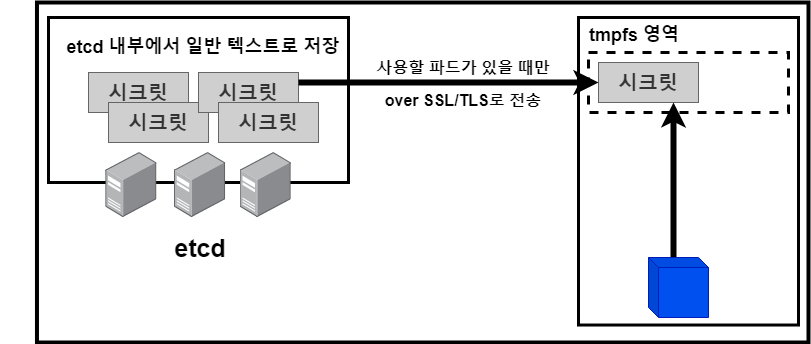
시크릿 데이터는 쿠버네티스 마스터의 etcd라는 분산 KVS(Key-Value Store)에 저장된다.
-
실제 시크릿을 사용하는 파드가 있는 경우에만 etcd에서 쿠버네티스 노드에 데이터를 보낸다.
-
이때 쿠버네티스 노드상에 영구적으로 데이터가 남지 않도록 시크릿 데이터 tmpfs 영역(메모리상에 구축된 임시 파일 시스템)에 저장되게 되어 있다.
-
쿠버네티스 버전과 환경에 따라서는 etcd에 저장된 시크릿이 암호화되지 않을 수 있으므로, etcd에 접근할 수 있는 권한을 제한해야 합니다.
📜 컨피그맵과 시크릿의 데이터 마운트 시 퍼미션 변경
컨피그맵에 저장된 스크립트를 파드에서 실행하는 경우 컨피그맵 데이터에서 볼륨을 생성할 때 실행 권한을 부여할 수 있다.
-
시크릿도 저장된 기밀 데이터를 파드에 마운트하는 경우 시크릿 데이터에서 볼륨을 생성할 때 퍼미션을 부여할 수 있다.
-
컨피그맵과 시크릿 모두 기본값 0644로 마운트된다. (퍼미션은 8진수 표기에서 10진수 표기로 변환한 형태를 사용하여 기술해야 한다.)
-
예시) 256 -> 0400 -> r– — — 493 -> 0755 -> rwx- r-x r-x 420 -> 0644 -> rw- r– r–
-
# 예제에서는 컨피그맵 내부의 test.sh를 0755로 마운트하고 이 스크립트를 그대로 실행할 수 있다.
$ cat <<EOF > sample-configmap-scripts.yaml
apiVersion: v1
kind: Pod
metadata:
  name: sample-configmap-scripts
spec:
  containers:
  - name: configmap-container
    image: nginx:1.16
    command: ["/config/test.sh"]
    volumeMounts:
    - name: config-volume
      mountPath: /config
  volumes:
  - name: config-volume
    configMap:
      name: sample-configmap
      items:
      - key: test.sh
        path: test.sh
        mode: 493
EOF

# 작동 확인
$ kubectl logs sample-configmap-scripts
Hello, Kubernetes
# 시크릿 내부의 모든 데이터를 0400으로 마운트한다.
$ cat <<EOF > sample-configmap-secure.yaml
apiVersion: v1
kind: Pod
metadata:
  name: sample-secret-secure
spec:
  containers:
  - name: secret-container
    image: nginx:1.16
    volumeMounts:
    - name: config-volume
      mountPath: /config
  volumes:
  - name: config-volume
    secret:
      secretName: sample-db-auth
      defaultMode: 256
EOF


# 실제로 파일을 확인해보면 기본값 0644에 0400으로 변경되어 마운트된 것을 확인할 수 있다.
$ kubectl exec -it sample-secret-secure -- ls -l /config
total 0
lrwxrwxrwx 1 root root 15 Apr  8 13:20 password -> ..data/password
lrwxrwxrwx 1 root root 15 Apr  8 13:20 username -> ..data/username

$ kubectl exec -it sample-secret-secure -- ls -l /config/..data/
total 8
-r-------- 1 root root 12 Apr  8 13:20 password
-r-------- 1 root root  5 Apr  8 13:20 username
📜 동적 컨피그맵 업데이트
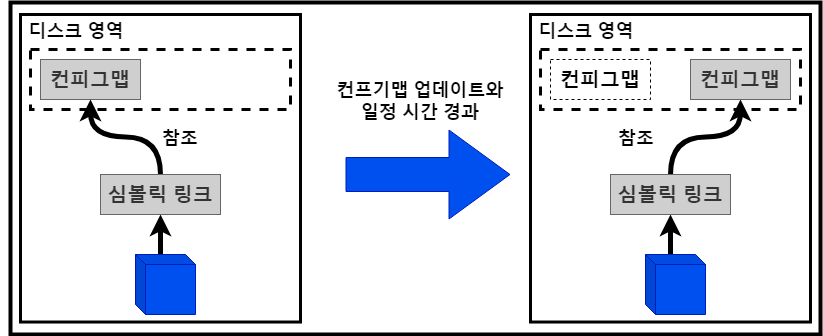
볼륨 마운트를 사용한 컨피그맵에서는 일정 시간마다 kube-apiserver로 변경을 확인하고 변경이 있을 경우에는 파일을 교체한다.
-
업데이트 간격은 60초로 설정되어 있고, 이 간격을 조정할 경우에는 kubelet의 –sync-frequency 옵션을 설정한다.
-
환경 변수를 사용한 컨피그맵은 기동할 때 환경 변수가 정해지기 때문에 동적으로 업데이트 할 수 없다.
# 컨피그맵이 마운트되어 있는 디렉터리 확인
$ kubectl exec -it sample-configmap-multi-volume -- ls -al /config
total 12
drwxrwxrwx 3 root root 4096 Apr  8 11:47 .
drwxr-xr-x 1 root root 4096 Apr  8 11:47 ..
drwxr-xr-x 2 root root 4096 Apr  8 11:47 ..2023_04_08_11_47_17.2283803633
lrwxrwxrwx 1 root root   32 Apr  8 11:47 ..data -> ..2023_04_08_11_47_17.2283803633
lrwxrwxrwx 1 root root   21 Apr  8 11:47 connection.max -> ..data/connection.max
lrwxrwxrwx 1 root root   21 Apr  8 11:47 connection.min -> ..data/connection.min
lrwxrwxrwx 1 root root   17 Apr  8 11:47 nginx.conf -> ..data/nginx.conf
lrwxrwxrwx 1 root root   24 Apr  8 11:47 sample.properties -> ..data/sample.properties
lrwxrwxrwx 1 root root   14 Apr  8 11:47 test.sh -> ..data/test.sh
lrwxrwxrwx 1 root root   13 Apr  8 11:47 thread -> ..data/thread


# 파드의 /config/thread 파일 내용 확인
$ kubectl exec -it sample-configmap-multi-volume -- cat /config/thread
16


# 컨피그 맵 변경 전의 경과 시간(AGE) 확인
$ kubectl get pod sample-configmap-multi-volume
NAME                            READY   STATUS    RESTARTS   AGE
sample-configmap-multi-volume   1/1     Running   0          109m
-
이번 예제에서는 컨피그맵 내용을 thread만으로 kubectl apply 했기 때문에 그 외의 파일(nginx.conf 등)이 삭제된 점에도 주의하자.
-
단, 처음에 컨피그맵을 생성할 때 “kubectl apply” 나 “kubectl craete –save-config”를 사용하여 생성하지 않을 경우 매니페스트 병합처리가 불완전하여 결과가 달라진다.
# 컨피그맵 업데이트
$ cat <<EOF | kubectl apply -f -
apiVersion: v1
kind: ConfigMap
metadata:
  name: sample-configmap
data:
  thread: "32"
EOF
# 컨피그맵이 마운트되어 있는 디렉터리 확인
$ kubectl exec -it sample-configmap-multi-volume -- ls -al /config
total 12
drwxrwxrwx 3 root root 4096 Apr  8 13:38 .
drwxr-xr-x 1 root root 4096 Apr  8 11:47 ..
drwxr-xr-x 2 root root 4096 Apr  8 13:38 ..2023_04_08_13_38_03.285047011
lrwxrwxrwx 1 root root   31 Apr  8 13:38 ..data -> ..2023_04_08_13_38_03.285047011
lrwxrwxrwx 1 root root   13 Apr  8 11:47 thread -> ..data/thread


# 16에서 32로 변경된 내용 확인
$ kubectl exec -it sample-configmap-multi-volume -- cat /config/thread
32


# 동적 파일이 변경된 후의 결과 시간(AGE) 확인
$ kubectl get pod sample-configmap-multi-volume
NAME                            READY   STATUS    RESTARTS   AGE
sample-configmap-multi-volume   1/1     Running   0          113m
📜 시크릿이나 컨피그맵의 데이터 변경 거부
시크릿이나 컨피그맵의 “immutable” 설정을 변경하면 데이터가 변경되는 것을 방지하고 예상치 못한 시스템 변경도 방지할 수 있다.
-
변경이 거부된 시크릿이나 컨피그맵의 데이터를 변경하는 경우에는 리소스를 삭제하고 나서 다시 생성해야 한다.
-
또 볼륨으로 마운트하고 있는 경우는 파드 재생성도 필요하다.
-
장점으로는 리소스 변경을 감시할 필요가 없어지므로 쿠버네티스의 시스템적 성능 문제를 해결할 수도 있다는 것을 들 수 있다.
# 변경할 수 없는 시크릿 생성
$ cat <<EOF > sample-secret-immutable.yaml
apiVersion: v1
kind: Secret
metadata:
  name: sample-secret-immutable
type: Opaque
data:
  username: cm9vdA==
  password: cm9vdHBhc3N3b3Jk
immutable: true
EOF


# username을 root에서 hoge로 변경 시도
$  kubectl patch secret sample-secret-immutable -p '{"data": {"username": "aG9nZQ=="}}'
The Secret "sample-secret-immutable" is invalid: data: Forbidden: field is immutable when `immutable` is set
댓글 남기기